1.8.x
Tính Năng: Asyntai AI Chatbot
Tác giả: Asyntai
Phiên bản: 1.0.0
Gửi lúc: 14/09/2026
Cập nhật lúc: 14/09/2026
Third Party Integration Communication
Mô tả
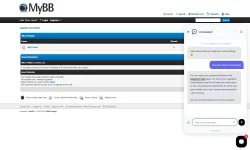
Asyntai AI Chatbot puts an AI assistant on your MyBB board. A chat button sits in the corner of every page. Visitors ask a question in their own words, and the assistant answers from your own content: your website, your uploaded documents and your help articles. It answers 24/7 in more than 80 languages, detected from the question.
What it does- Answers visitor questions instantly on every board page: index, forums, threads, member list, search, portal.
- Stays open while the visitor moves between forums and threads.
- Uses your forum rules, FAQs and documentation to give accurate answers.
- Shows every conversation in your Asyntai dashboard, with the page it started on.
Installation
- Copy inc/plugins/asyntai.php from the zip into the inc/plugins folder of your board.
- Admin CP > Configuration > Plugins > Asyntai AI Chatbot > Install & Activate.
- Admin CP > Configuration > Settings > Asyntai AI Chatbot: paste your widget ID from the Asyntai dashboard (Setup & Integration). You can paste the whole snippet; the plugin keeps only the ID.
Settings- Asyntai widget ID: the chat is on while this holds a valid ID and off when it is empty.
- Show the chat only to guests: members who are logged in never see the chat.
- Script address: leave as it is unless you host the widget yourself.
How it works
The plugin hooks pre_output_page and adds one small script before the closing body tag, so it works with the default theme and with every custom theme. No template edits. The script waits for the page load event before it fetches the widget, so your board draws first and page speed is unchanged.
Requirements
MyBB 1.8 or newer and an Asyntai account. The free plan is enough to start:
asyntai.com
Documentation:
asyntai.com/documentation/integrations/mybb/
Support: hello@asyntai.com
Chatbot AI Asyntai đặt trợ lý AI lên bảng MyBB của bạn. Một nút chat nằm ở góc mỗi trang. Khách truy cập đặt câu hỏi bằng chính lời của họ, và trợ lý sẽ trả lời từ nội dung của bạn: trang web, tài liệu bạn tải lên và bài viết trợ giúp của bạn. Nó trả lời 24/7 bằng hơn 80 ngôn ngữ, được phát hiện từ câu hỏi.
Nó làm gì
- Trả lời câu hỏi của khách truy cập ngay lập tức trên mọi trang bảng: chỉ mục, diễn đàn, chủ đề, danh sách thành viên, tìm kiếm, cổng thông tin.
- Giữ nguyên trạng thái mở khi khách truy cập di chuyển giữa các diễn đàn và chủ đề.
- Sử dụng các quy tắc diễn đàn, câu hỏi thường gặp và tài liệu để đưa ra câu trả lời chính xác.
- Hiển thị mọi cuộc trò chuyện trong bảng điều khiển Asyntai của bạn, kèm theo trang mà nó bắt đầu.
Lắp đặt- Sao chép inc/plugins/asyntai.php từ file zip vào thư mục inc/plugins trên bo mạch của bạn.
- Quản trị viên CP > Cấu hình > Plugin > Asyntai AI Chatbot > Cài đặt & Kích hoạt.
- Quản trị viên CP > Cấu hình > Cài đặt > Asyntai AI Chatbot: dán ID widget của bạn từ bảng điều khiển Asyntai (Cài đặt & Tích hợp). Bạn có thể dán toàn bộ đoạn trích; plugin chỉ giữ lại ID.
Bối cảnh- ID widget Asyntai: cuộc trò chuyện bật khi nó giữ ID hợp lệ và tắt khi trống.
- Chỉ hiển thị cuộc trò chuyện cho khách: các thành viên đã đăng nhập sẽ không bao giờ thấy cuộc trò chuyện.
- Địa chỉ script: giữ nguyên như vậy trừ khi bạn tự host widget.
Cách hoạt độngPlugin sẽ móc pre_output_page và thêm một script nhỏ trước thẻ body tag, nên nó hoạt động với theme mặc định và với mọi theme tùy chỉnh. Không chỉnh sửa template. Script chờ sự kiện load trang trước khi lấy widget, nên board của bạn vẽ trước và tốc độ trang không thay đổi.
Yêu cầu
MyBB 1.8 hoặc mới hơn và tài khoản Asyntai. Gói miễn phí là đủ để bắt đầu:asyntai.com
Tài liệu:asyntai.com/documentation/integrations/mybb/
Hỗ trợ: hello@asyntai.com
Hình Ảnh